MW Taxonomy: WordPress GUI for creating and managing taxonomies
MW Taxonomy, developed by Mats Westholm, is a WordPress plugin that gives a graphical interface to register and manage custom taxonomies without writing PHP. The plugin converts taxonomy arguments into dashboard controls for labels, hierarchy, visibility, rewrite slugs, and post-type links so administrators can shape site classification from the admin area. Aimed at WordPress site owners, content architects, and developers, it moves taxonomy setup out of theme code into an administrative workflow.
How well does MW Taxonomy register taxonomies without coding?
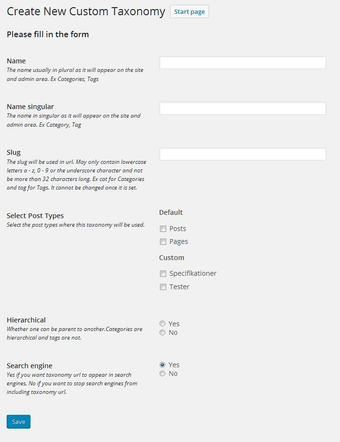
MW Taxonomy maps the manual register_taxonomy process to form fields in the admin, so taxonomy arguments become saved settings instead of hand-edited PHP. That mapping covers label text, hierarchical mode, and registration flags, which lets administrators define classification types that behave like native taxonomies. For developers this reduces the need to add registration code to themes or custom plugins for standard taxonomy needs.
Can taxonomies be attached to post types and control permalink structure?
The plugin supports linking new taxonomies to standard posts, Pages, and existing custom post types and exposes rewrite slug configuration to adjust permalinks for SEO. Visibility flags affect front-end queries and admin menus; the settings include:
public toggle for front-end exposure
queryable toggle affecting WP_Query behavior
admin visibility toggle for menu presence
Those controls let site architects decide whether a taxonomy appears in archives or only in back-end lists.
Is the admin interface appropriate for content architects and developers?
The plugin integrates into the dashboard and keeps the workflow focused on taxonomy definitions rather than on broader content modelling. It presents a straightforward form-based editor, which benefits administrators who prefer an admin-first approach. User reception notes the plugin’s legacy status and fewer modern UI refinements compared with newer content-modeling suites, so teams that expect advanced visual editors may find the interface conservative.
How portable and persistent are taxonomy definitions across sites?
MW Taxonomy includes import/export for moving taxonomy configurations between installations, which supports migrations and staging workflows. If the plugin is deactivated, registered taxonomies disappear from admin and the front end while stored term relations remain in the database, so export or migration is advisable before removing the plugin. Compatibility with the latest major WordPress releases should be validated on staging prior to production deployment.
Practical choice for admin-driven taxonomy workflows with a conservative interface
For site owners and content architects who prefer dashboard-based configuration over editing PHP, the plugin supplies a focused, low-overhead method to define classification schemes. It suits small-to-medium sites with stable taxonomies; run compatibility checks on a staging environment before production. This makes the plugin a practical choice when taxonomy definitions change infrequently and deployment simplicity matters.
Pros
No-code registration replaces register_taxonomy with dashboard forms
Associates taxonomies with posts, Pages, and custom post types
Custom rewrite slugs let you shape SEO-friendly URLs
Import/export moves taxonomy configurations between installs
Cons
Legacy admin UI lacks modern content-modeling refinements
Deactivating removes taxonomy registration though data stays in database
Compatibility with latest major WordPress versions may require testing
Laws concerning the use of this software vary from country to country. We do not encourage or condone the use of this program if it is in violation of these laws. Softonic may receive a referral fee if you click or buy any of the products featured here.